Benefits enrollment that runs on configuration, not code.
BENI-365 is a single platform that adapts to every client's plans, rules, and roles — so onboarding a new employer group means configuring data, not rewriting pages.
- Tenant-isolated data on every table
- Full audit trail on every election and login
- Role-based access, least privilege by default
Every role gets its own module — and only the access it needs
Full plan and employee administration — scoped to their own organization only. Row-level security keeps every admin confined to their tenant, so no one ever sees another client's people or plans.
A dedicated view across the book of business they service, including production reporting on premium written by client and plan — without day-to-day HR administration access or unnecessary employee data.
Access limited to the enrollment sessions and appointments assigned to them — enough to guide an employee through elections, without a standing door into HR administration.
Employees see only their own coverage, elections, and dependents — never a coworker's — with every change captured in a full audit trail.
See BENI-365 at work
Real screens from the platform, shown with a sample employer: an employee enrolling from start to finish, the booking link employees use to schedule a call with a counselor, and the Compensation Analysis HR teams use to see what the company puts into benefits.
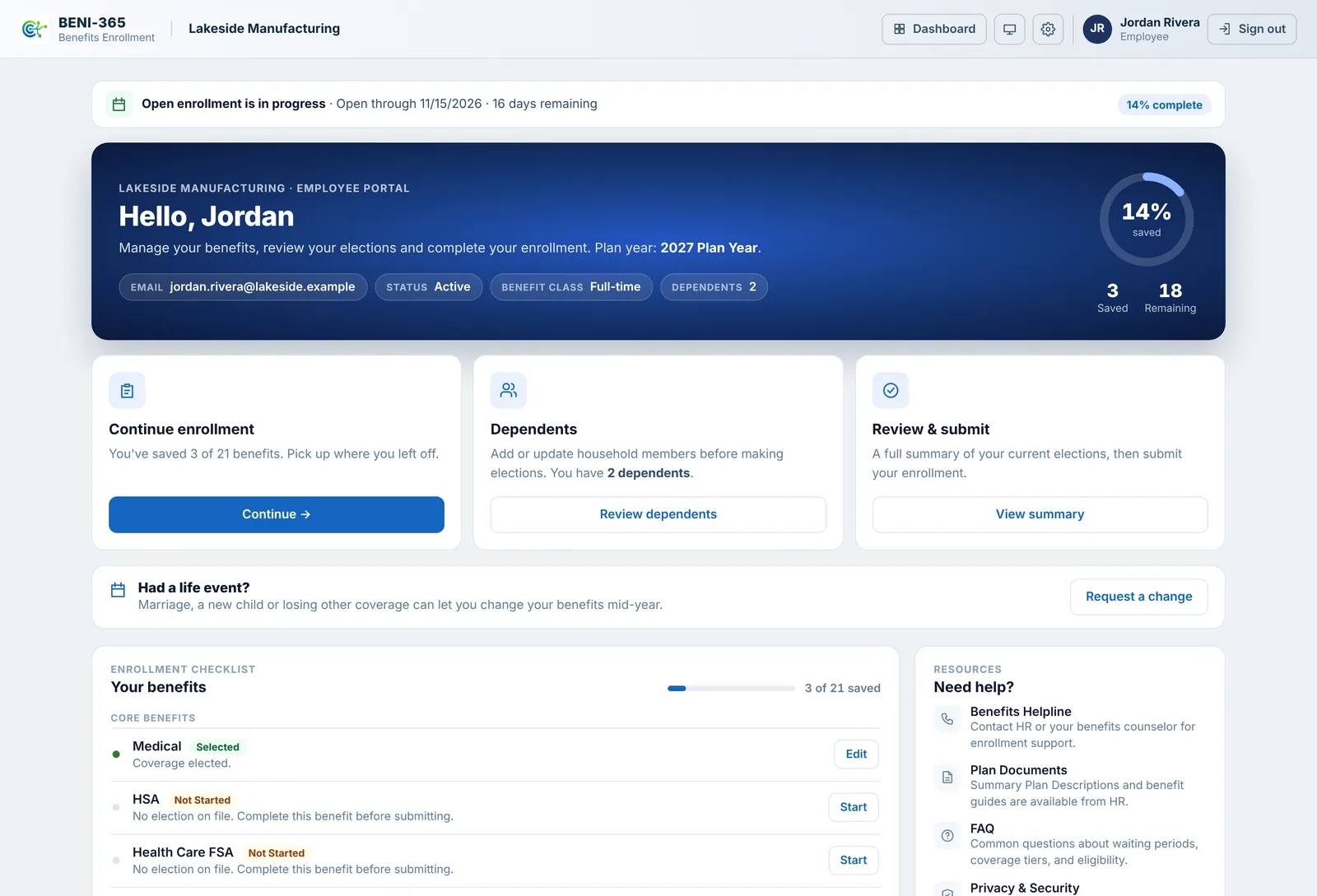
One place to enroll
Employees see their enrollment window, what's saved and what's left, their dependents, and a checklist of every benefit their employer offers.
- Save and come back; progress is kept
- Life events for mid-year changes
- Review everything, then sign and submit
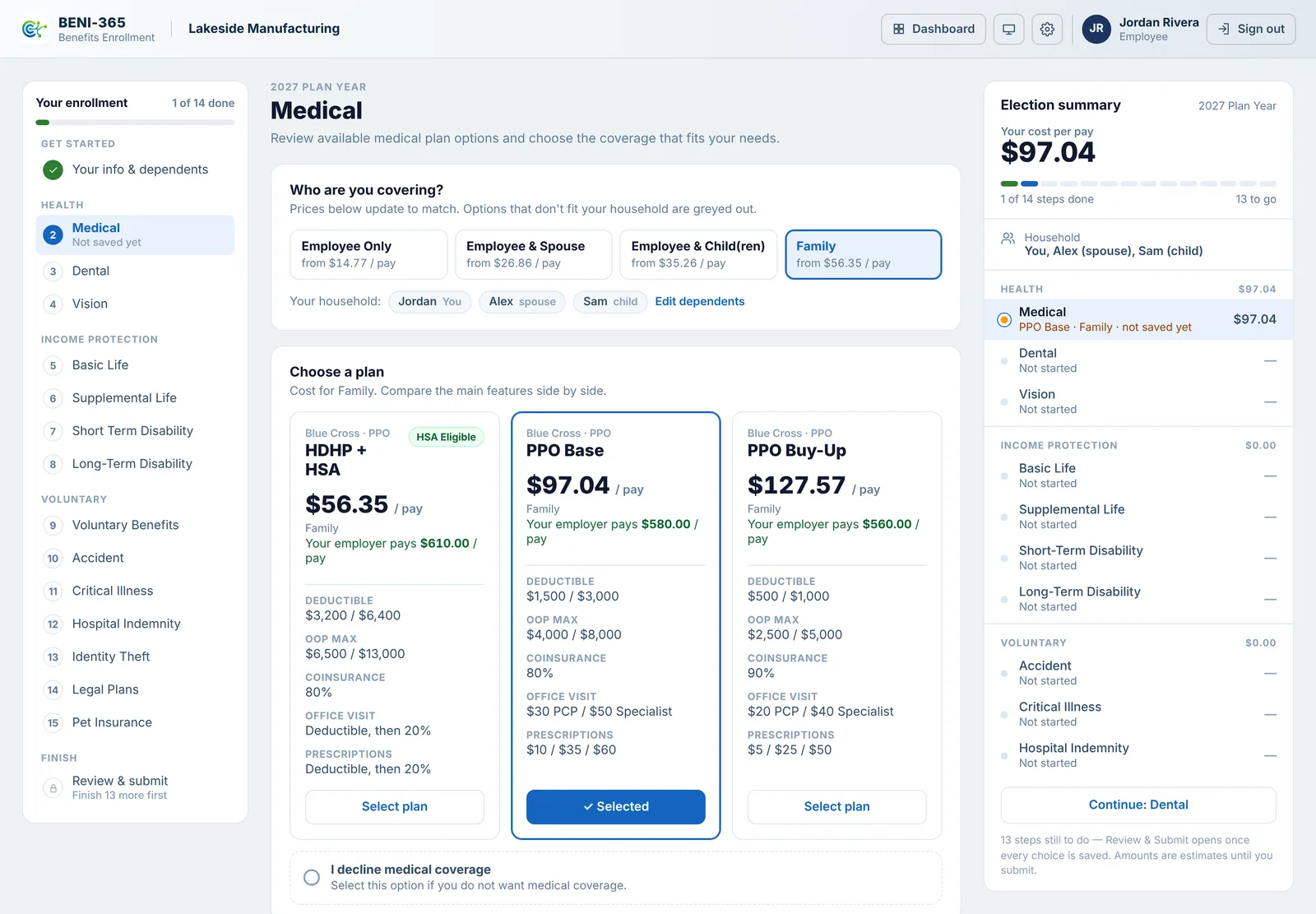
Compare plans, and see what the employer pays
Employees pick who they're covering, and every plan's price updates to match. Each plan also shows what the employer contributes at that coverage level, so employees see the full value of their benefits.
- Employer contributions by coverage level, on every plan
- HSA employer amounts that follow the medical choice
- Employer-paid Life and Disability shown at $0.00
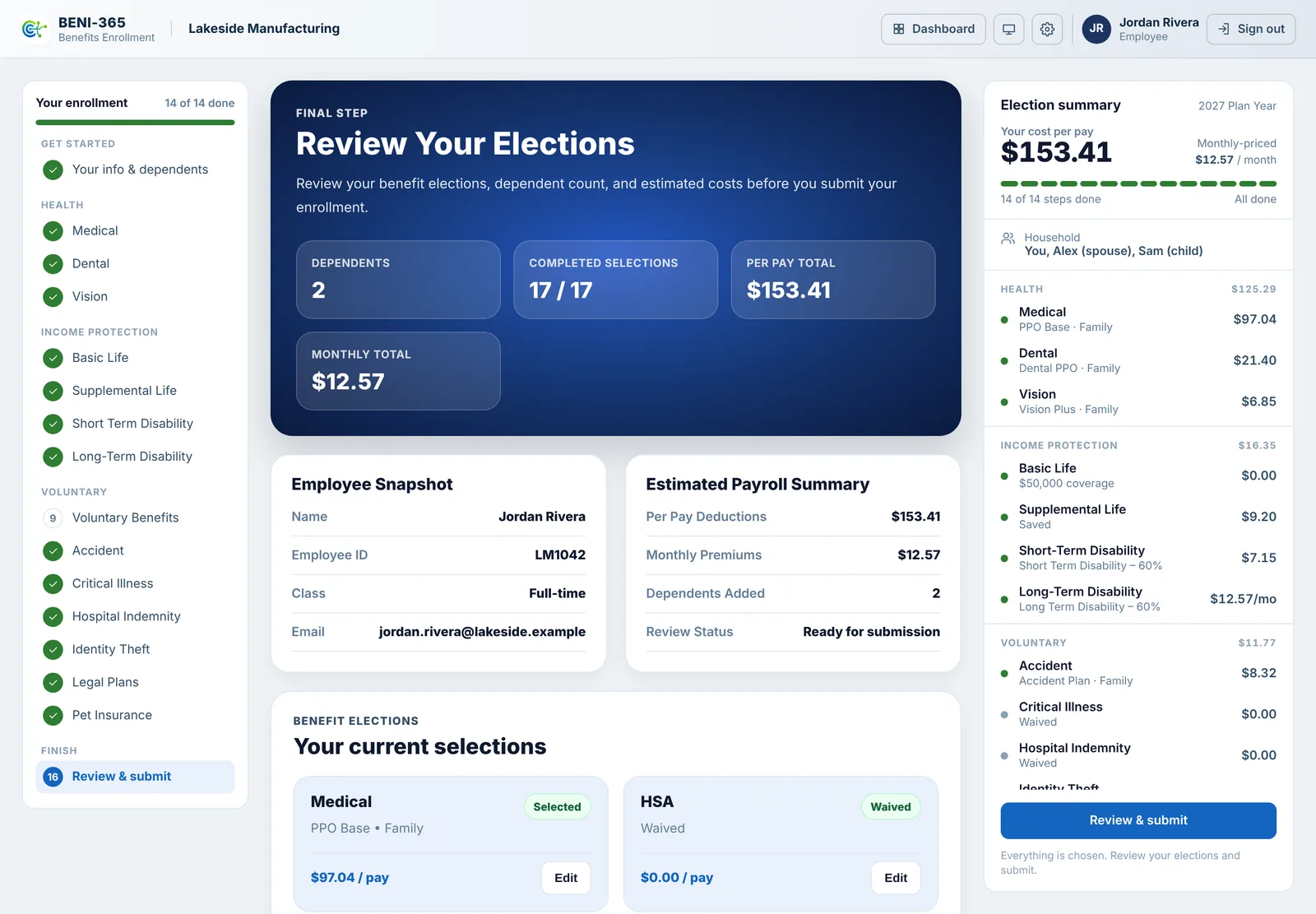
Review everything before signing
One page with every election, waiver and dependent, the per-pay and monthly totals, and an edit button next to each benefit.
- Submit opens only when every benefit has a choice
- Electronic signature with the statement agreed to
- Costs shown per pay, the way paychecks see them
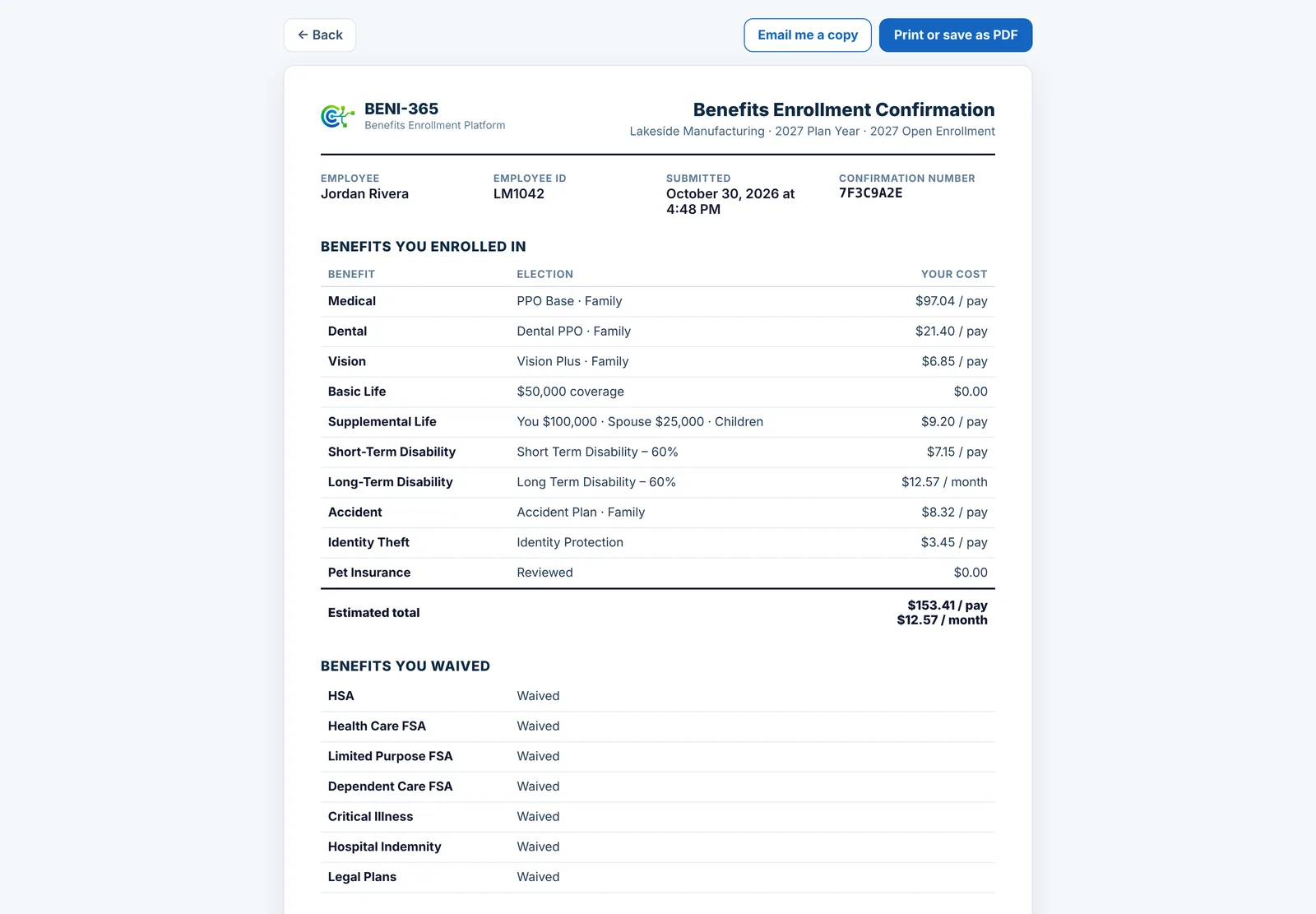
A confirmation employees can keep
A signed record of what each employee chose, what they waived and what it costs, with a confirmation number.
- Print, save as PDF or email a copy
- Kept exactly as signed, with a check that it hasn't changed
- Waivers listed with their reasons
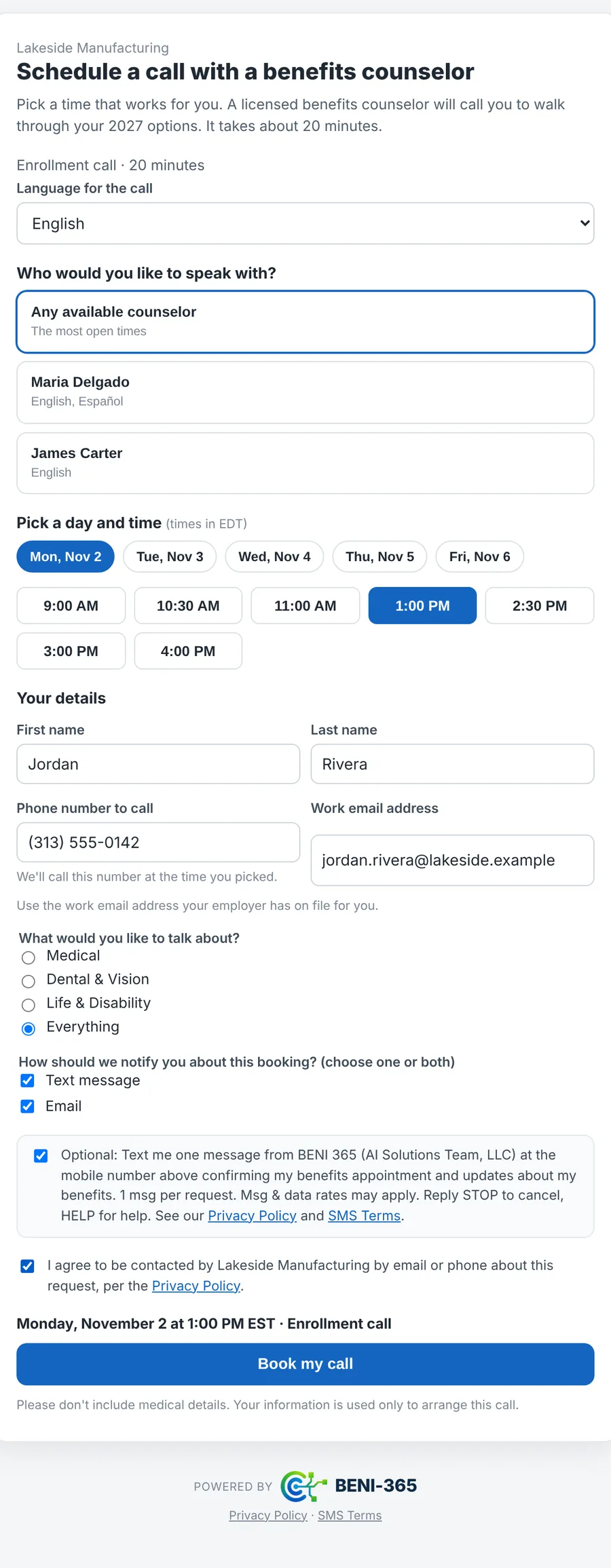
A booking link employees use without signing in
Send it in an email or add it to the employer's website. Employees pick a counselor, a language and a time, and choose a text confirmation, an email, or both.
- Matched to the employer's census by work email, phone or employee ID
- The client's own questions and carrier-ready text consent
- Shared with BENI Voice as one link
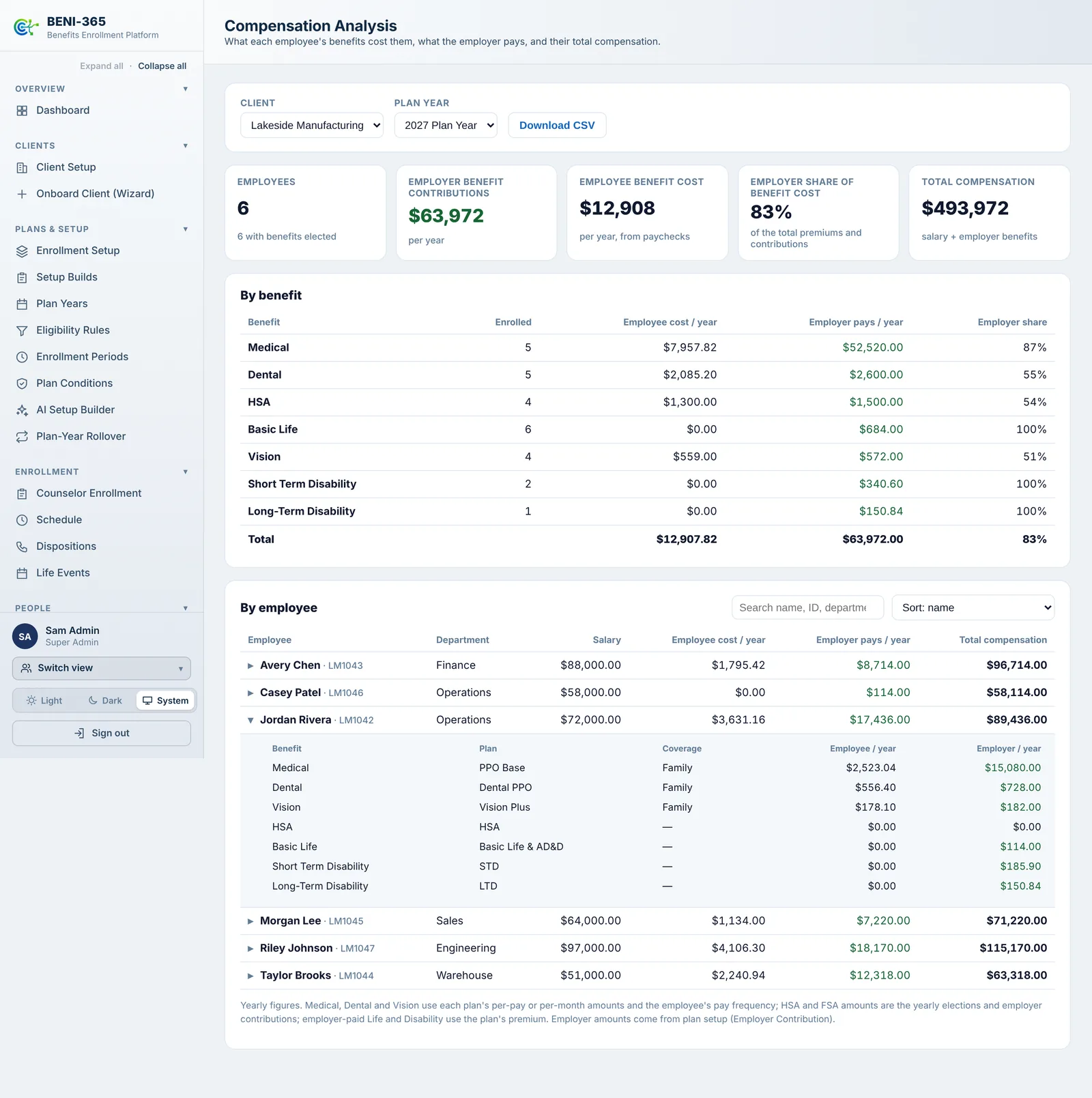
Compensation Analysis
For each plan year: what employees pay for their benefits, what the employer contributes, and every employee's total compensation, salary plus employer benefits.
- By benefit: enrollment, employee cost, employer share
- By employee, with each benefit's plan and coverage level
- Download as CSV for total-rewards statements
Screens show a sample employer with made-up names and data.
Add-on modules that grow with you
The core enrollment engine ships standard. These modules extend it — turned on per client, based on what each one actually needs.
BENI · Guide Studio
Branded benefit guides
- Create branded guides in minutes
- Approve with confidence
- Bilingual benefit guides — English & Spanish
- Distribute to employees effortlessly
Guide AI Assist
AI-drafted copy & images
- Draft with AI in seconds
- Generate on-brand, copyright-clear images
- Refine & improve content
BENI · Connect
Guide distribution, announcements & engagement analytics
- Distribute guides by email
- Send announcements & enrollment reminders
- Track engagement with audience filters
BENI · Multi-Language
Spanish enrollment for Medical
- Employee-chosen enrollment language
- Spanish plan text alongside English
- Per-client English-only override
BENI · Engage
SMS & automated outreach
- Text-message announcements & reminders
- Employees opt in at sign-up or any time, and opt out any time
- Double opt-in consent, with STOP and HELP handled automatically
- One-click email inviting employees to turn texts on
BENI · Counselor Scheduling
Book time, track production
- A booking link employees use without signing in — email it or add it to your website
- Counselors see their full schedule in one place, by day, week or list
- Languages, breaks, client-specific hours and VIP flags
- Production analytics per counselor, per client
BENI · Carrier Export
834 EDI and payroll deduction files
- Standard ANSI 834 file generation
- Payroll deduction files from submitted elections
- Scheduled or on-demand carrier feeds
BENI · Engagement Analytics
See how communications perform
- Delivery, open, and click tracking on sends
- Completion lift after reminders
- Who-was-sent-what, tied to your audit trail
BENI · AI Setup Builder
From plan documents to a reviewed setup
- Upload carrier, broker and employer documents
- AI drafts the plan provisions it finds
- Your team approves each one; the client signs off
BENI · Compensation Analysis
Total compensation, benefit by benefit
- What the employer pays toward each benefit
- Each employee's salary plus employer benefits
- By benefit and by employee, with a CSV export
BENI Voice connection
AI-assisted benefits calls, in sync
- Employees, plans, schedules and documents shared both ways
- Calls booked by voice land on the same schedule
- Elections from a call come back for the employee to confirm
BENI · Knowledge Base
Every client document in one place
- Plan documents, SPDs and the client's own PDF guide
- By plan year, division and language
- AI help to describe, search and draft from documents
Built for how benefits teams actually work
Everything a HR or benefits team needs to run open enrollment — without a separate build for every client.
Multi-tenant by design
Every client gets tenant-isolated data, roles, and permissions on one platform — never a code fork.
Configurable enrollment models
Tier, election, employee-only, or acknowledgment — the right pattern for every product, with what the employer pays for each coverage level, all set through configuration.
Plan years & eligibility rules
Model waiting periods, class-tiered rates, and eligibility logic without touching a line of code.
An employee experience that makes sense
A guided enrollment flow with benefit guides, review, and confirmation — built for people who aren't insurance experts.
Communications & benefit guides
Distribute benefit guides, enrollment reminders, and off-season announcements straight from the platform.
Reporting & audit trail
Every election, change, and login is logged and reportable — built with SOC 2 principles from day one.
Life events & what's changed
Mid-year changes with documents and HR approval, and a plain-language "what's changed for you" view at renewal.
Counselor-assisted enrollment
Counselors enroll alongside employees in a logged session, with call dispositions and production tracking.
Help built in
BENI Chat answers "how do I…" questions for HR teams and counselors right inside the app.
One platform. Built around your people.
Five simple layers work together behind the scenes, so switching employers never means starting from scratch.
From new client to open enrollment
Configure the client
Set up branding, roles, and access for the new tenant.
Load the plans
Import plan years, rates, tiers, and eligibility rules.
Import the census
Bring employee data in through a structured upload.
Employees enroll
A guided, product-aware flow with review and confirmation.
Track & report
Real-time completion tracking and exportable reporting.
Your people's data, protected like it matters
Every table, every role, every action is scoped and logged from the ground up — because the people trusting you with their benefits deserve real protection, not an afterthought.
See BENI-365 on your own plans
Send us your open enrollment timeline and we'll walk you through the platform on real plan data.